Agreements and messages - Peppi
Select from the top navigation E-Services > Agreements and messages

Agreements
The purpose of the agreements function in Peppi is to make contracts between the students and the UAS. The agreements can relate to completing studies or to recognition of prior learning.
When an agreement is made or it is being edited, a student will receive an email notification about it. You cannot reply to the message via email. Log in to Peppi to reply so that all messages are saved in Peppi.
Once the agreement is saved, it is visible to the student in the agreements section of Peppi. Find information about the agreement status, type, title, teacher and description in the general view. Click the title to see more information.

Functions for agreement processing
- Edit: edit the agreement information when necessary. Edited agreements are sent to the other party for comment or acceptance.
- Accept: accept an agreement. The other party will be notified about the acceptance.
- New message: send messages about the agreement
Messages
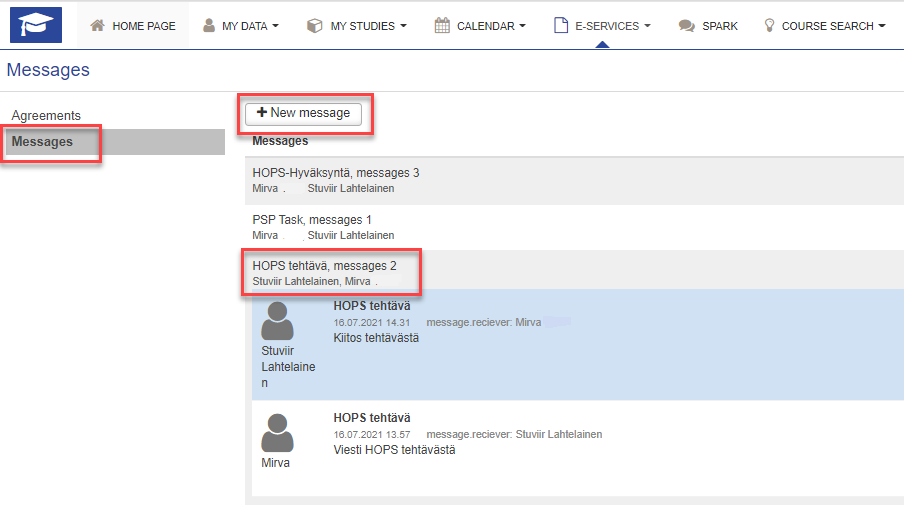
By clicking Messages you will find all the messages you have sent and received in Peppi. You may start a new message by clicking New message. Fill in the recipient and message subject and content, and click Send. By clicking Cancel, you may return without sending.
When you click a subject title of a message thread, you may open and close the thread.
Please note that you can not answer to any messages in this view. Answering takes place in the Messages tab in your PSP.