
Graduation
Congratulations! Your studies are almost complete. The checklist below will help you take all the necessary steps before you graduate.
Remember to do these things before you graduate:
If there are any issues in your study plan, your graduation application will be returned to you for corrections, which may delay your graduation. Please note that your graduation date is determined by the date on which a complete and error-free graduation application has been received by Student Services.
Study Plan Structure
Check that the correct degree structure and curriculum period are selected in your study plan (see the instructions: Study Plan). If you are unsure what your study plan should look like, please contact your tutor teacher.
Thesis
Update your thesis study module to the latest version (2026–2027), regardless of whether you are still waiting for your thesis grade to be recorded, your thesis is still in progress, or you are just starting it. Instructions for updating the study module version: Sisu – Study Plan. Please note that your thesis completion must be recorded in Sisu before you can apply for graduation.
If you completed your thesis during summer 2026 and are only waiting for the grade to be recorded, you do not need to register for the thesis implementations again. Your teacher will record the completion directly in Sisu.
If your thesis is still in progress or you are just starting it, you can register for the thesis implementations in Sisu after updating the study module to the latest version.
Incomplete Studies and Duplicate Completions in the Study Plan
Remove any courses from your study plan for which you do not have a completed course record. If you have duplicate course completions in your study plan, make sure that only one of them is included in the plan. Leave the duplicate completion outside the study plan. The same course can only be included in the study plan once. You can make these kinds of study plan changes, such as adding or removing studies, in the Free Edit Mode.
Completed Study Modules
Make sure that all credits required for your degree are included in your study plan and that all study modules have been completed. Also make sure that all study modules requiring approval have been approved by your tutor teacher and that their status is shown as approved in Sisu. See the instructions: Sisu - Study Plan Study module statuses and credits.
Discuss Your Study Plan with Your Teacher
Review your study plan with your teacher before applying for graduation. If you encounter any challenges while finalizing your study plan, contact your teacher well in advance.
Check that your personal information (address, phone number) and personal email address are up to date and correct in Sisu. Your personal email address must be correct in Sisu, as the degree certificate will be sent to that email address.
Any deficiencies or errors must be reported to Student Services: studentservices@lab.fi
NOTE: Before applying for graduation, make sure that all study modules have been completed and approved. If there are any issues in your study plan, your graduation application will be returned to you for corrections, which may delay your graduation. Please note that your graduation date is determined by the date on which a complete and error-free graduation application has been received by Student Services.
Once you have completed all the studies required for your degree programme, a "Request Graduation" banner will appear at the top of your study plan in Sisu. To start your graduation application, click the link shown in the banner.
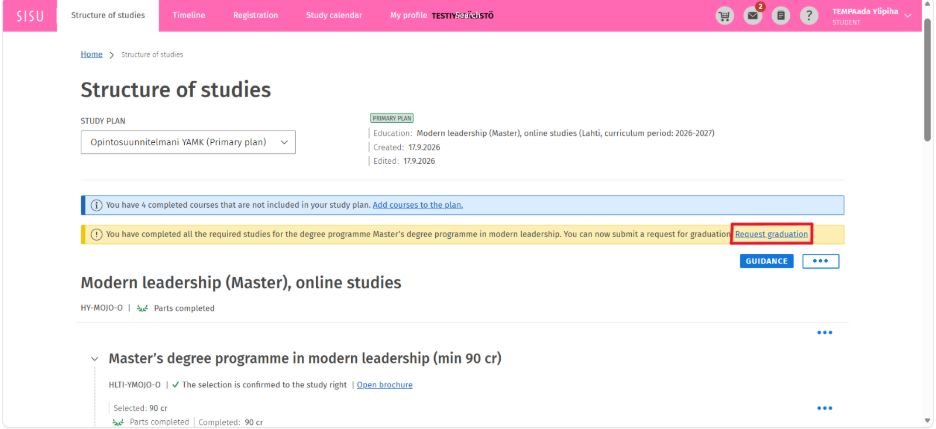
OR
If you are applying for graduation but don´t see the banner or your final grades are not yet visible in Sisu, open the degree programme brochure in your study plan.
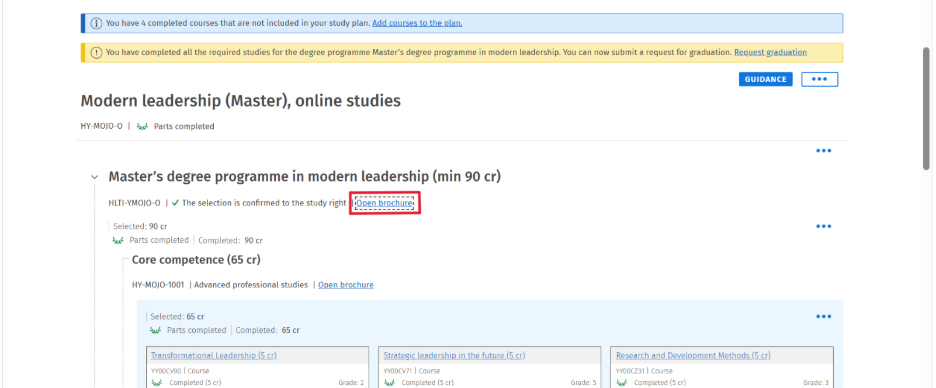
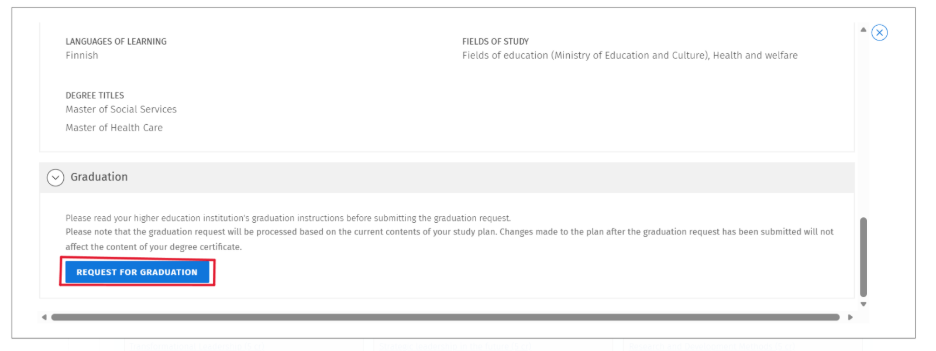
In the following window, scroll down and click the "Request for Graduation" button under the Graduation section.
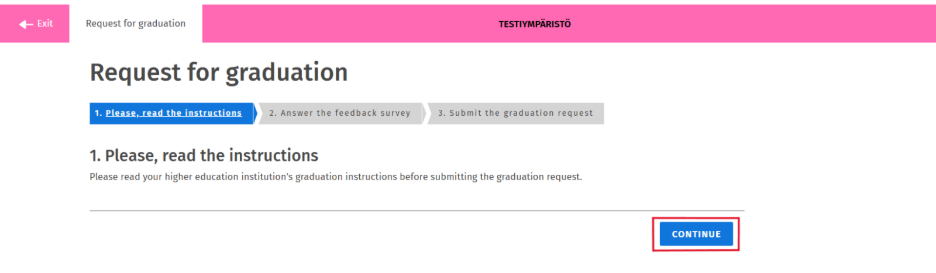
On the first page of the graduation application, carefully read the graduation instructions before proceeding with the application form. Then click "Continue".
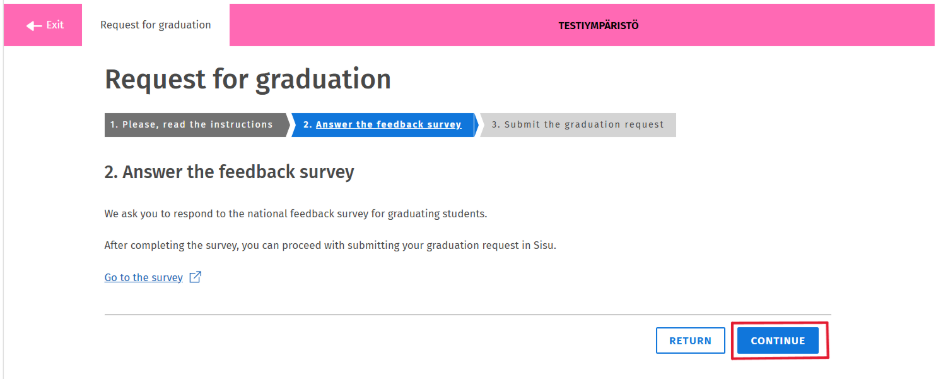
On the second page of the graduation application, complete the feedback survey before selecting "Continue."
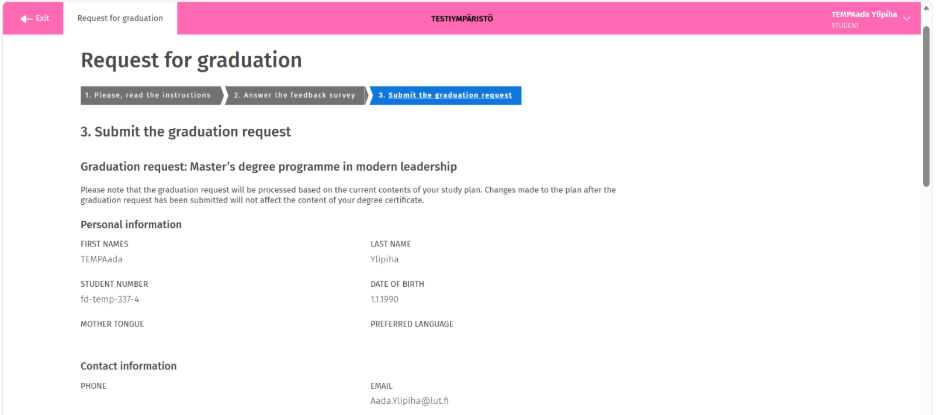
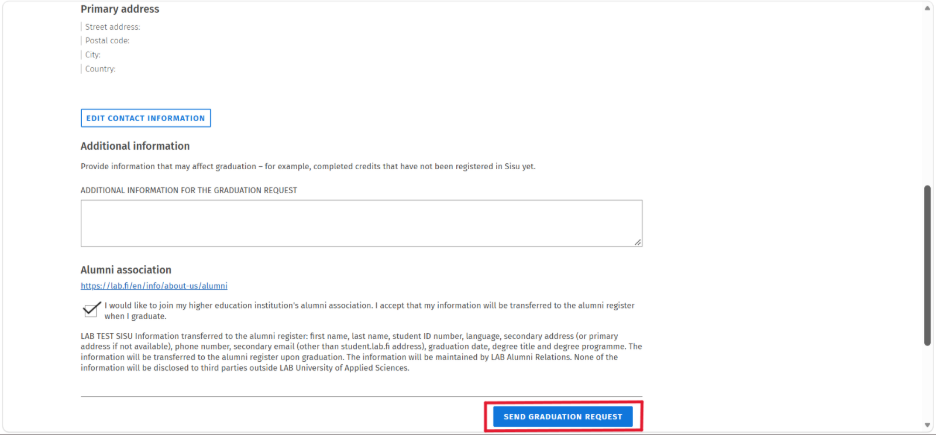
In the final step, review all personal information carefully to ensure it is correct. NOTE: Please make sure that your personal email address is correct, as your degree certificate will be sent to that email address. If necessary, you can add additional information to your graduation request and indicate your interest in LAB’s alumni regoster. Finally, click "Send Graduation Request."
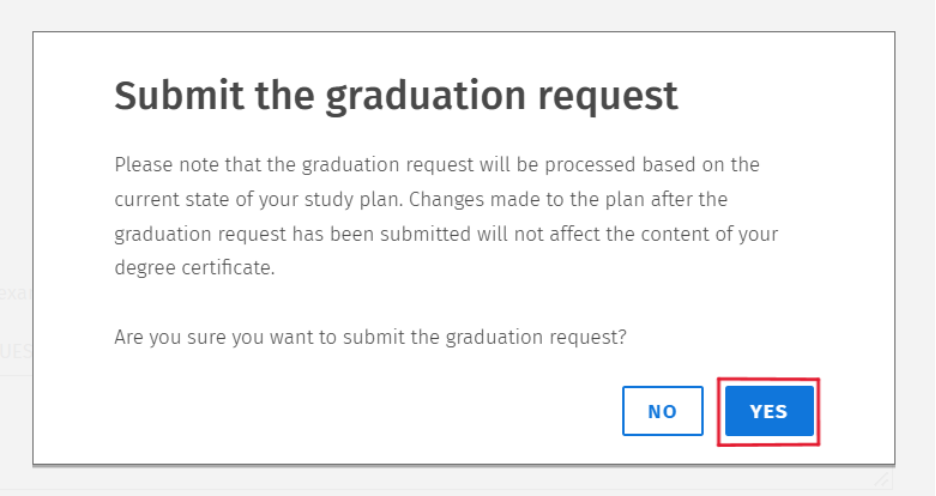
Next, a confirmation window will appear asking you to confirm the submission of your graduation request. Click "Yes" to proceed.
Once your graduation request has been submitted, a green banner stating "Graduation Request Submitted" will appear at the top of Sisu. After your graduation request has been processed, you will receive a notification in Sisu and in your study plan. In addition, you will receive an email containing a link to download and save your degree certificate.
The aim of the career services is to support students' smooth transition to the labor market. The target groups are all students from the beginning of their studies until they find their first position from their own field. Further information here.
- Graduates in the social and health care should apply to Finnish Supervisory Agency (earlier: Valvira) to practise as a health care professional.
- Finnish Supervisory Agency grants the right to practise a social welfare or health care profession on application to professionals trained in Finland and abroad.
- You must apply for a professional right yourself through Finnish Supervisory Agency's online service after you have graduated. You do not need to submit your diploma or other attachments to the system as the service will receive your graduation information from other systems. There is a fee when submitting the application
- A copy of your passport or your ID card are not needed.
More detailed instructions and a link to Finnish Supervisory Agency's e-services.
The English page is under construction. As soon as it is published, it will be updated to this page.
E-mail: ammattioikeudet@lvv.fi
Telephone: +358 295 256 932 (Monday–Friday 9–15)
NOTICE! As of January 1, 2026, the granting of professional rights in social and health care has transferred from Valvira to new Finnish Supervisory Agency. This reform was part of the restructuring of the state’s regional administration.
The web address for electronic services will change, and the old Valvira address is now redirected to the new agency’s website. The new web address will be specified later, and a link to the new agency’s site will be added to this page once it is published.
If an application has already been pending before 1.1.2026, its processing will automatically continue at the Finnish Supervisory Agency as of January 1, 2026.
We wish to keep in touch with our graduates and give you a chance to network with other alumnus. As our alumni and working life partner you will get information on the possibilities for continuous education, future events, exhibitions and seminars. You can share your knowhow as a visiting lecture or tell about your own career path and working life experiences for our students.
Before graduation remember to restore emails and documents from school cloudservices to yourself.
Remove any transfer from school email to your own email, because school ICT services will close after graduation.
Tip: Before you graduate, take a copy of the course descriptions of the courses you have taken or save the link to the Study Guide where you can find the descriptions. Even if you are not planning to go on to further study at the moment, you are very likely to need them in the future if you apply to another school.
Return your keycard
In Lahti return the electronic key of Niemenkatu if you had it. (Niemenkatu 73).
In Lappeenranta returning the access key is not mandatory. If you wish, you can return the key to the KOE member service desk (8118) during opening hours or drop it at the mailbox in front of KOE association room (8163).
Cancel any parking contract
If you have a parking contract with eParking, please also remember to terminate your parking contract when you are graduated. This will avoid monthly fees and free up your seat for the queue.
Please empty the lockers on campus from your belongings!
You can continue using LUT Academic Library's print collection even though you no longer have access to e-materials after your graduation.
Update your contact information here.
You can find the schedules related to graduation here in the Student Calender.
If you have any questions about graduation, please contact the student services: studentservices@lab.fi