
Sisu - Studies Completed During an International Student Exchange
Studies completed during an international exchange are usually included in the complementary competence studies section of your degree.
In Sisu, this is done by creating study drafts in your study plan for the courses you intend to complete during your exchange. These studies will then be transferred to your degree through the credit transfer process after you return from your exchange. Instructions for this process can be found below.
If you have any questions about the student exchange itself, please contact LAB's International Mobility Services.
Discuss the studies you plan to complete during your exchange with your tutor teacher and prepare your exchange study plan, known as the Learning Agreement, in the LAB Mobility-Online system (external site, opens in a new tab). The Learning Agreement must be approved by the student exchange coordinator for your field of study.
Once your Learning Agreement has been approved, add the planned studies to Sisu as study drafts.
Approval and credit transfer for the studies completed during your exchange will only be applied for after you return from the exchange, so this should be done at that stage. Separate instructions are available for the credit transfer process.
Placing Studies in Your Study Plan Before the Exchange
Your study plan includes a section for Complementary Competence Studies, under which you will also find the study module Studies Completed During an International Student Exchange.
If you cannot see this study module in your study plan, you can add it by clicking the three-dot menu located on the right side of the Complementary Competence heading.

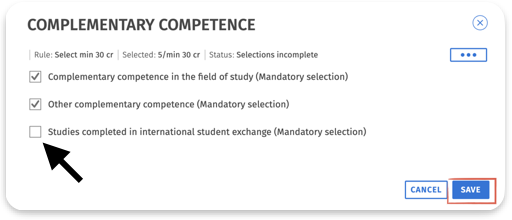
Search for Studies Completed in International Student Exchange in the list of study modules that opens and select it for your study plan. Then click Save.
After this, the study module you selected will appear under the Complementary Competence Studies section of your study plan. Click the three-dot menu on the right side of the study module to add the studies you plan to complete during your exchange as study drafts to your study plan.
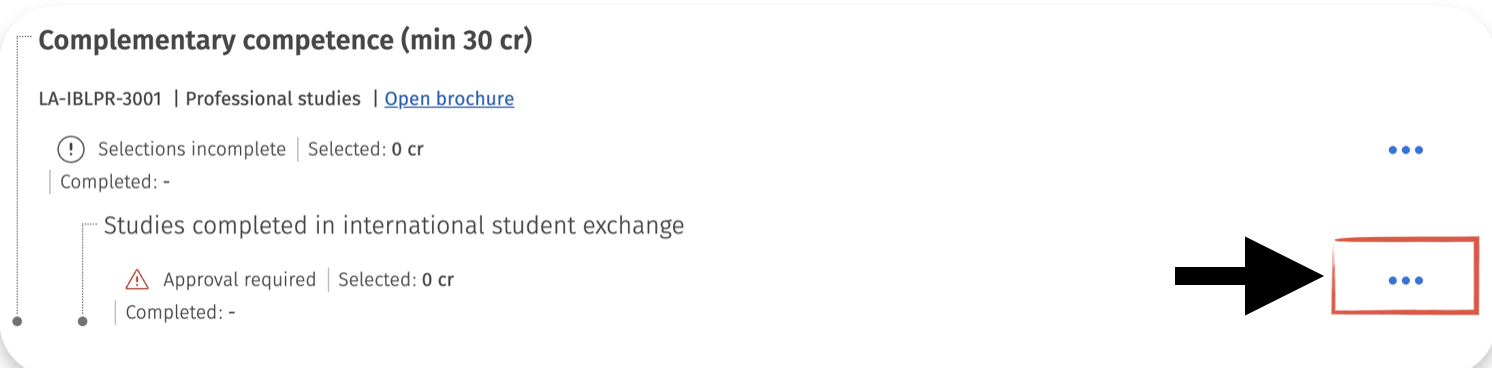
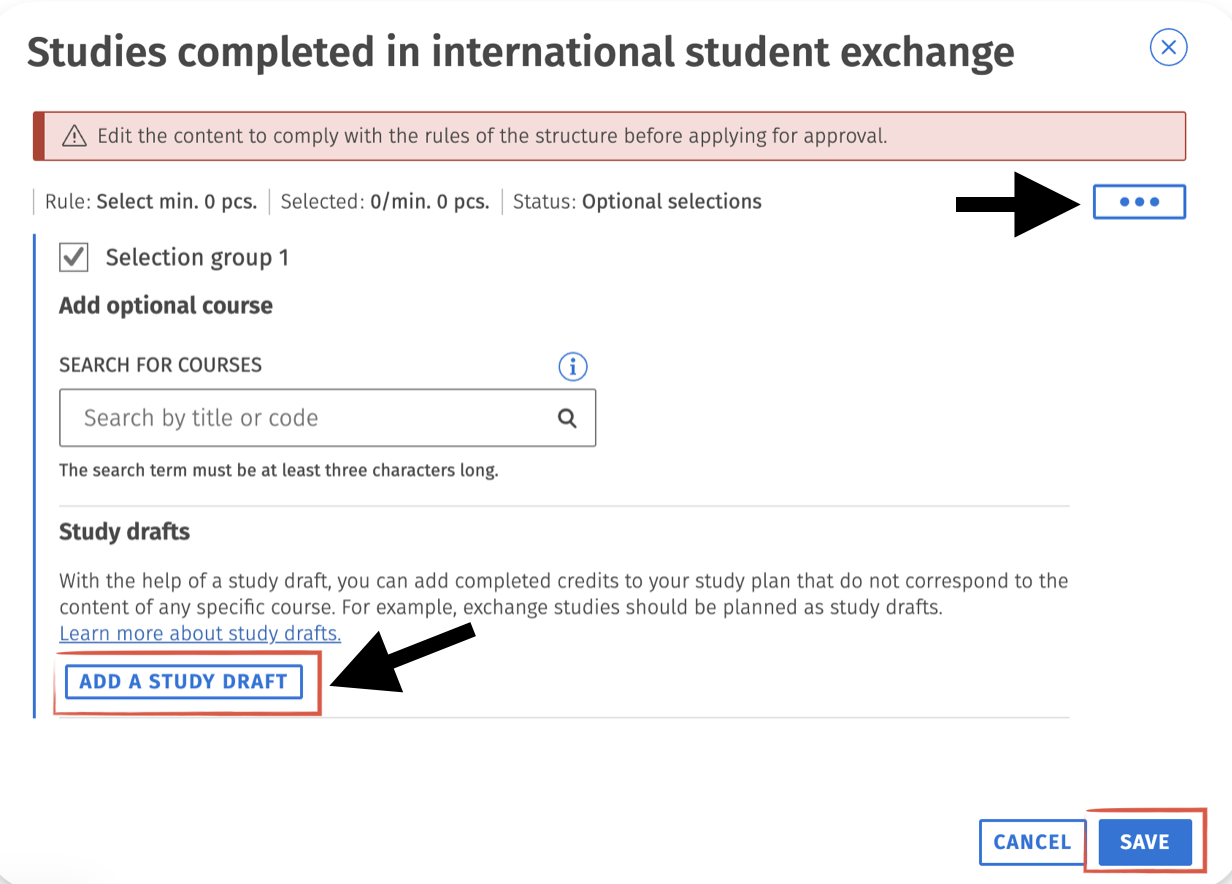
Add a study draft by clicking the Add Study Draft button. In some degree programmes you may have to add draft in free edit mode (Click again three dots)
At this stage, Sisu will notify you that approval must be applied for the study module. However, this approval should only be requested after you have returned from your exchange. Before applying for approval, you can review your study plan and make sure that you have created study drafts for all the studies you completed during your exchange.
The study draft must include the basic details of the course. Then it should be added and saved.
Please, remember to create a separate study draft for each course. Be sure to enter the credits in ECTS credits. If your host institution does not use the ECTS credit system, please check the credit conversion table on this page to find out how to convert the local credits into ECTS credits.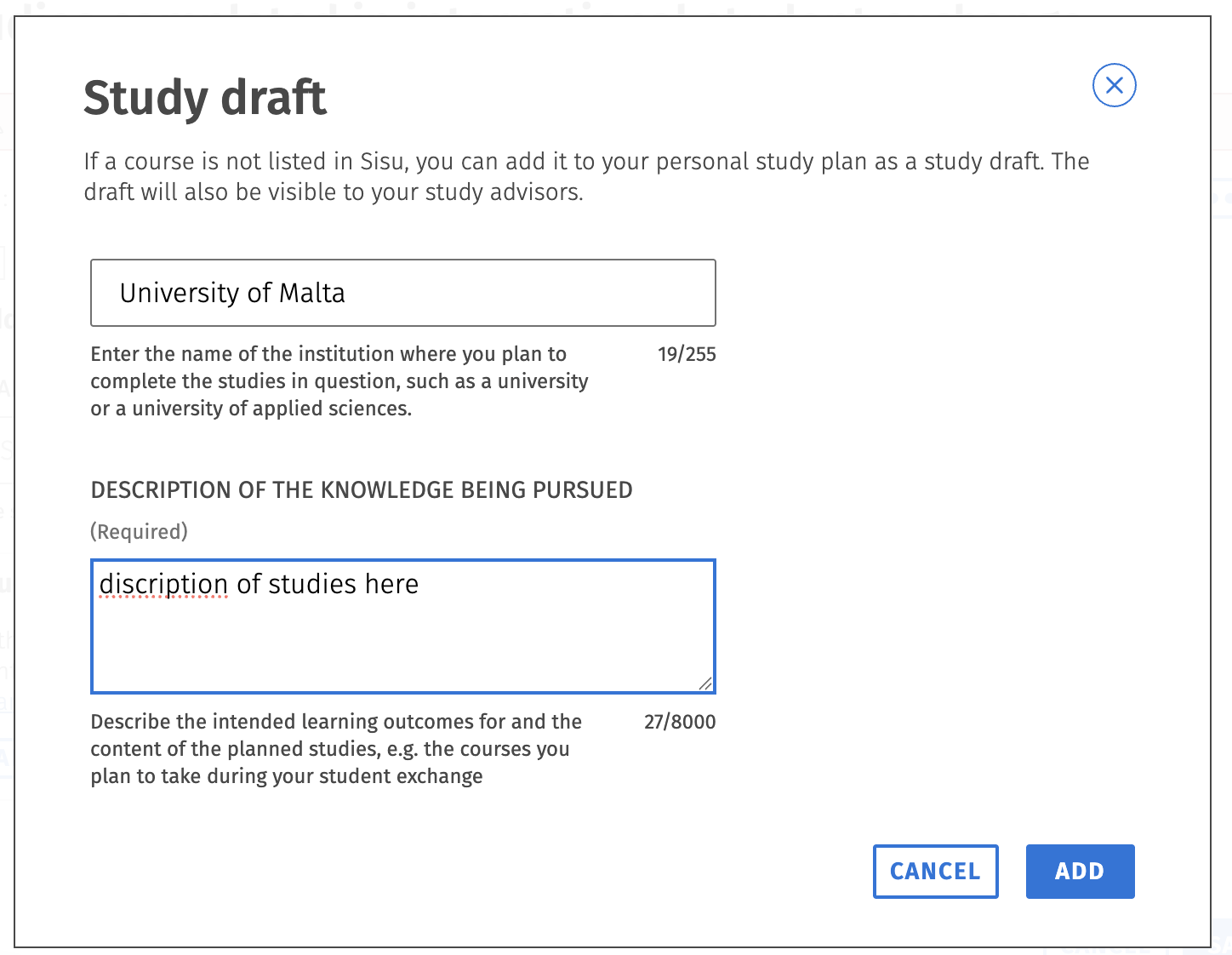
Once you have created a study draft, it will appear in your study plan under the Studies Completed During an International Student Exchange study module. By clicking the three-dot menu on the right side, you can create more study drafts.
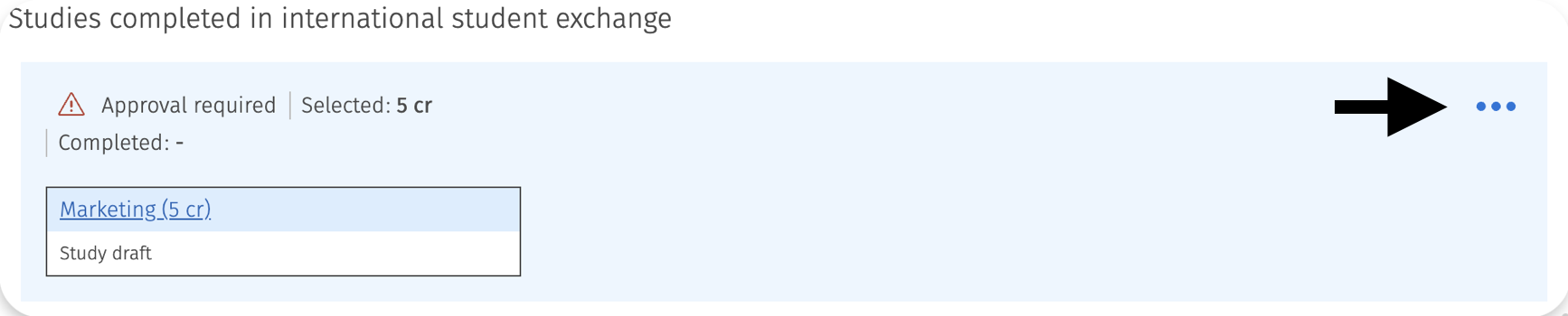
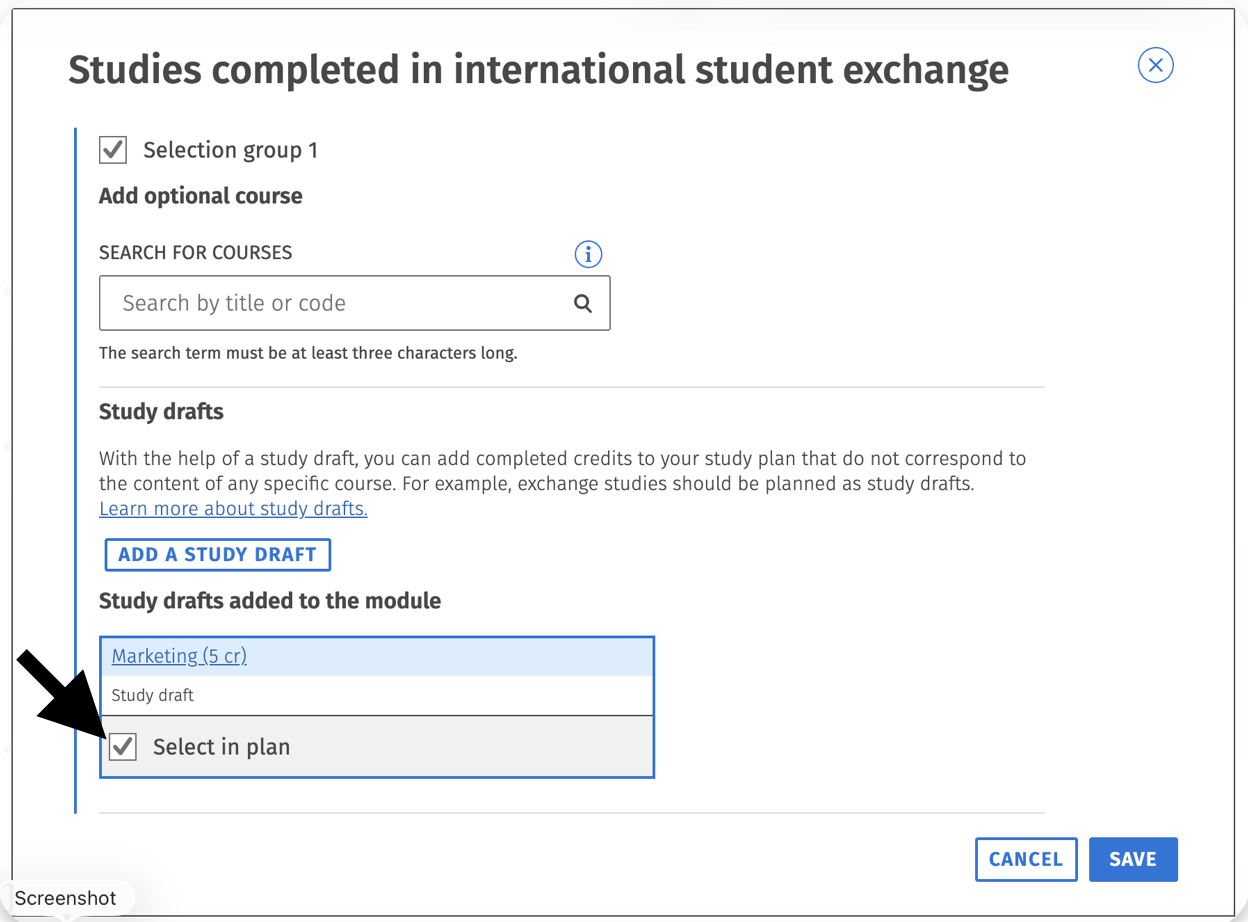
When creating additional study drafts, any previously created drafts will be displayed under the Study Drafts Added to the Module -heading. You can remove a previously created study draft from your study plan by clicking the Select for Study Plan button located below it, which will remove the draft from your study plan.
So if your exchange plans change and you do not complete all the studies you originally intended to take, you can use this feature to remove the unnecessary study drafts from your study plan before applying for approval of the study module.
The studies that have been approved by your tutor teacher in your exchange study plan (Learning Agreement) can usually be directly approved as part of the Complementary Competence Studies section of your degree.
However, please remember to discuss the matter with your tutor teacher if you would like to place the studies elsewhere in your study plan or if you complete different studies during your exchange than those originally planned.
Please note! Apply for approval of your exchange studies only after you have completed all the required steps in the “After Exchange”section in Mobility-Online. You will also receive a reminder email about these tasks approximately one month before the end of your exchange.
After completing these steps, you can apply for approval and final credit transfer from your tutor teacher in Sisu. Once your tutor teacher has processed your application, the completed studies will appear in your study plan and on your transcript of records.
Applying for Approval of the Study Module
Before applying for approval, review the study drafts you created before your exchange and make any necessary changes. You can remove unnecessary study drafts and add new ones if needed.
If the Studies Completed During an International Student Exchange section in your study plan displays the message Requires separate approval (see image below), you must apply for approval from your tutor teacher for both the study module and the individual courses included in it.
Apply approval first for individual courses and after that to study modul.
To apply for approval of the study module, click the pen icon on the right side.
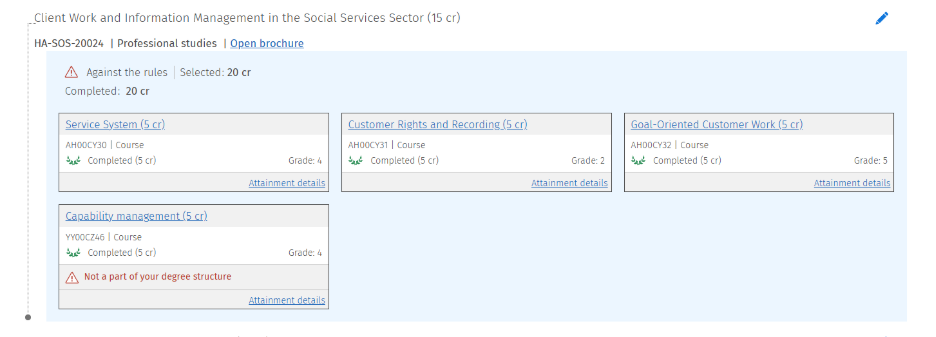
Sisu will open a window with a notification at the top indicating that the study module requires approval. Click the link Apply for Approval of the Study Module.
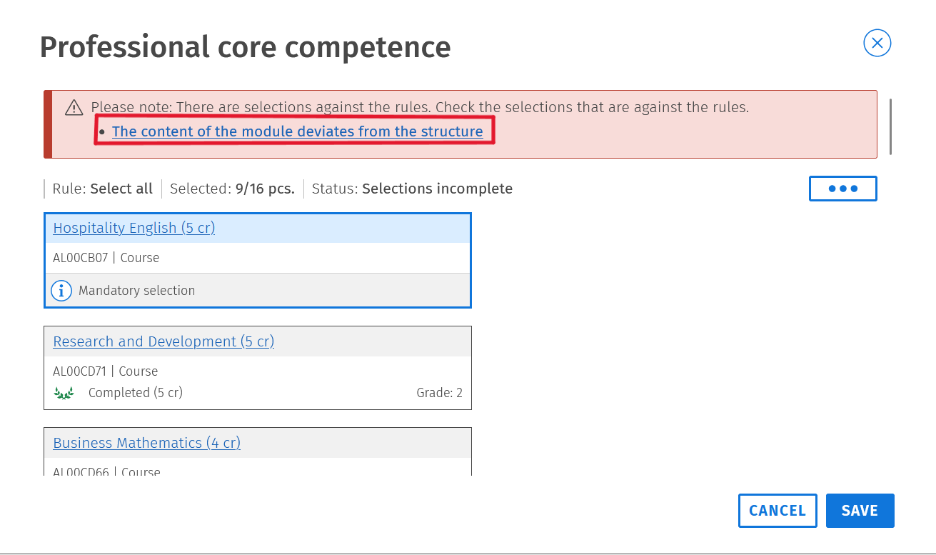
In the justification field, provide information about the contents of the study module and click Submit. Your tutor teacher will then be able to process the study module in your study plan.
Your study plan will show the submitted approval request until your tutor teacher has processed it.
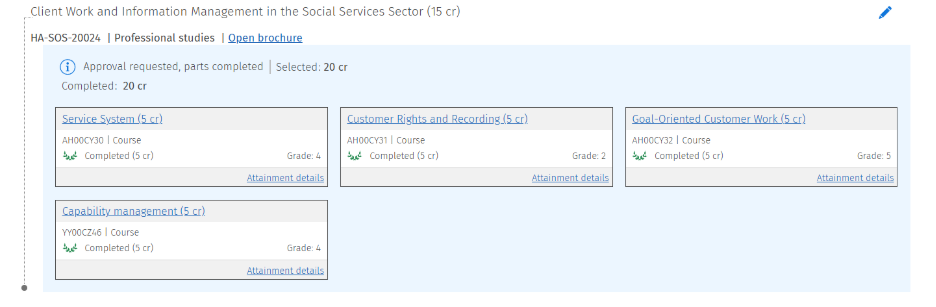
Applying for Credit Transfer of Individual Studies
After you have applied for approval of the study module (see the instructions above), you can proceed to apply for credit transfer for the studies you completed during your exchange.
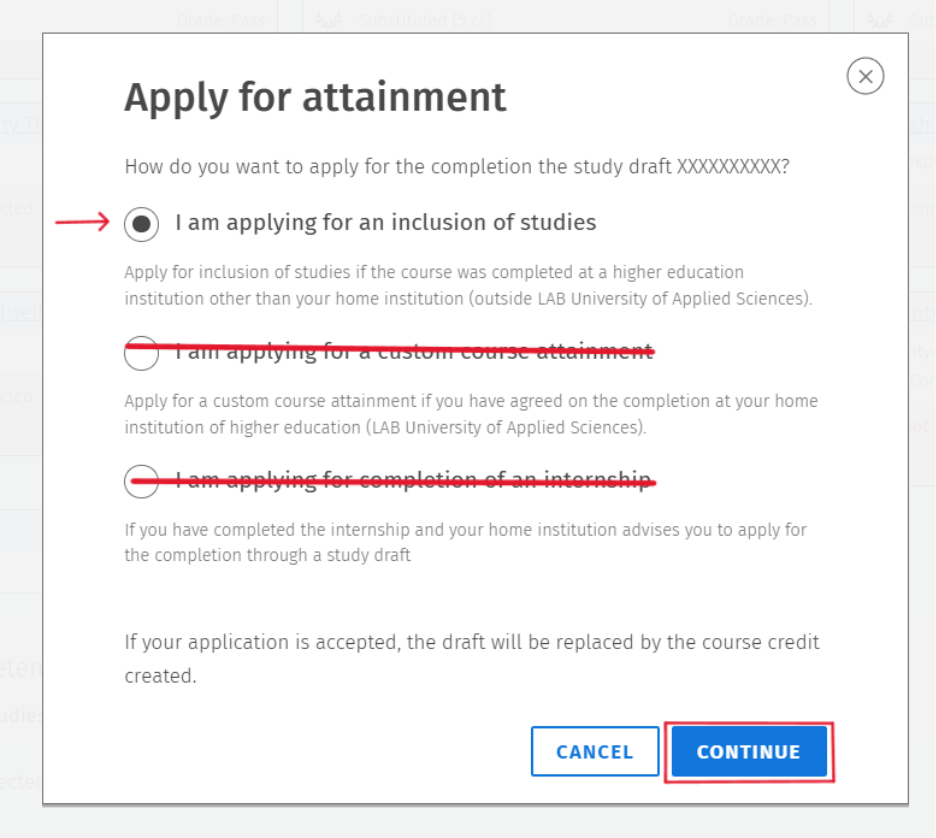
Click the name of a course that you added to your study plan. A window will open where you can apply for credit transfer by selecting Suggest Completion.
Select I am applying for inclusion of prior learning, as you are seeking credit transfer for studies completed at an institution other than LAB University of Applied Sciences. Then click Continue.
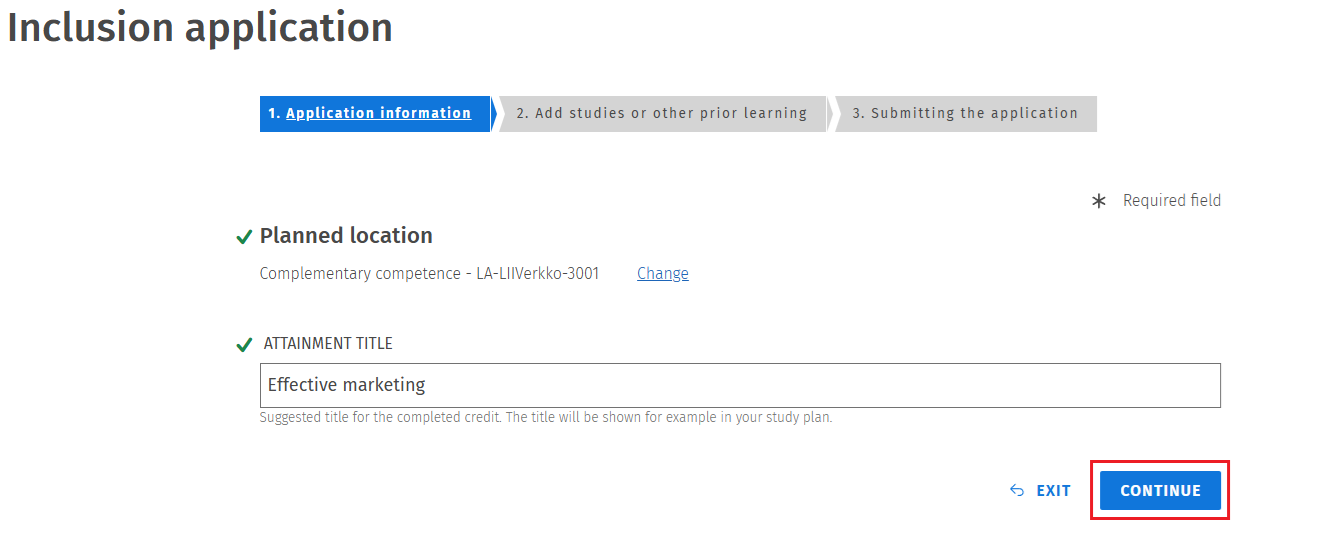
Check that the planned placement in your study plan and the course names are correct. Then continue to the next step.
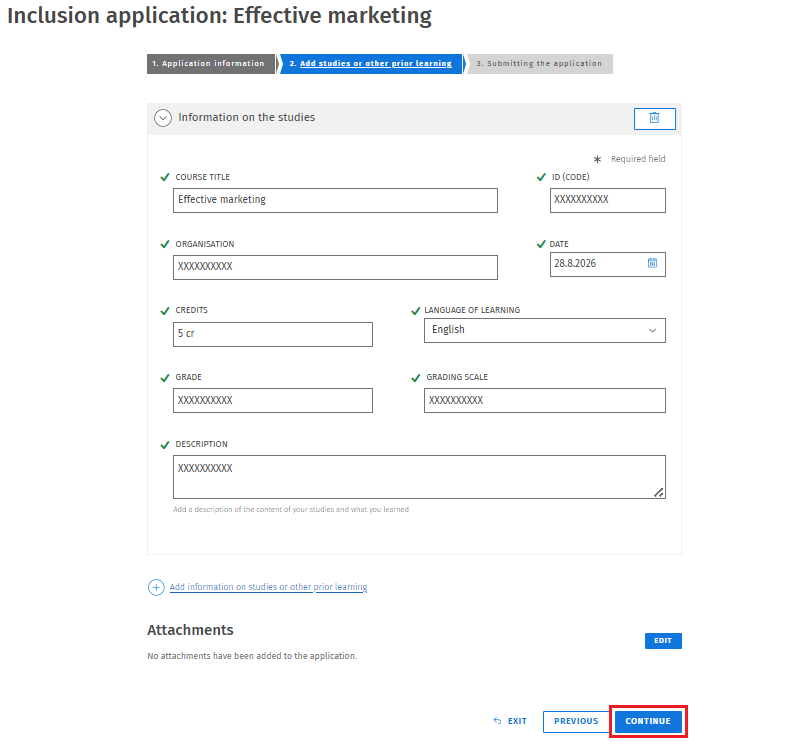
By clicking the Add Details of the Study or Competence link, you can enter more detailed information about the completed study.
Select Completed Study and continue.
Fields marked with an asterisk (*) are mandatory.
Please note: Starting from the academic year 2023-2024, courses completed during student exchange are recorded only with the assessment Pass (HYV). Grades awarded by the host institution are not converted. In the grading scale field, you may enter Pass/Fail.
Next, attach your official transcript of records from the host institution to the application.
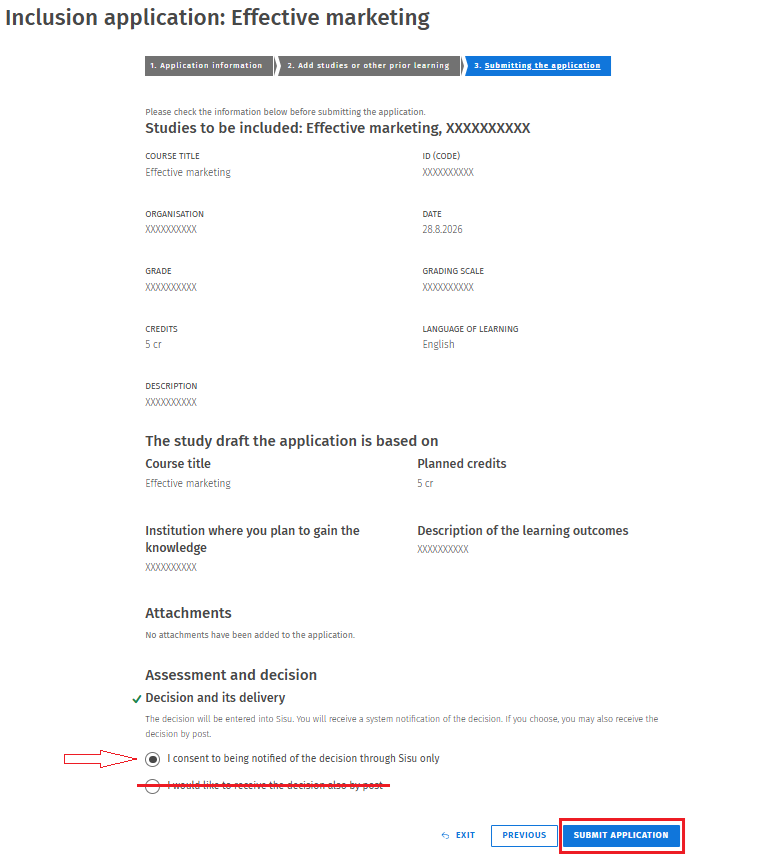
Review the information in your application to ensure that everything is correct. For notification of the decision, select the first option (see image below). The postal mail option is not available. Then submit the application.
Return to your study plan in Sisu and use these instructions to submit similar applications for all other studies completed during your exchange. Once your tutor teacher has processed the applications, the completed studies will appear in your study plan and on your transcript of records.