
PSP Scheduling - Peppi
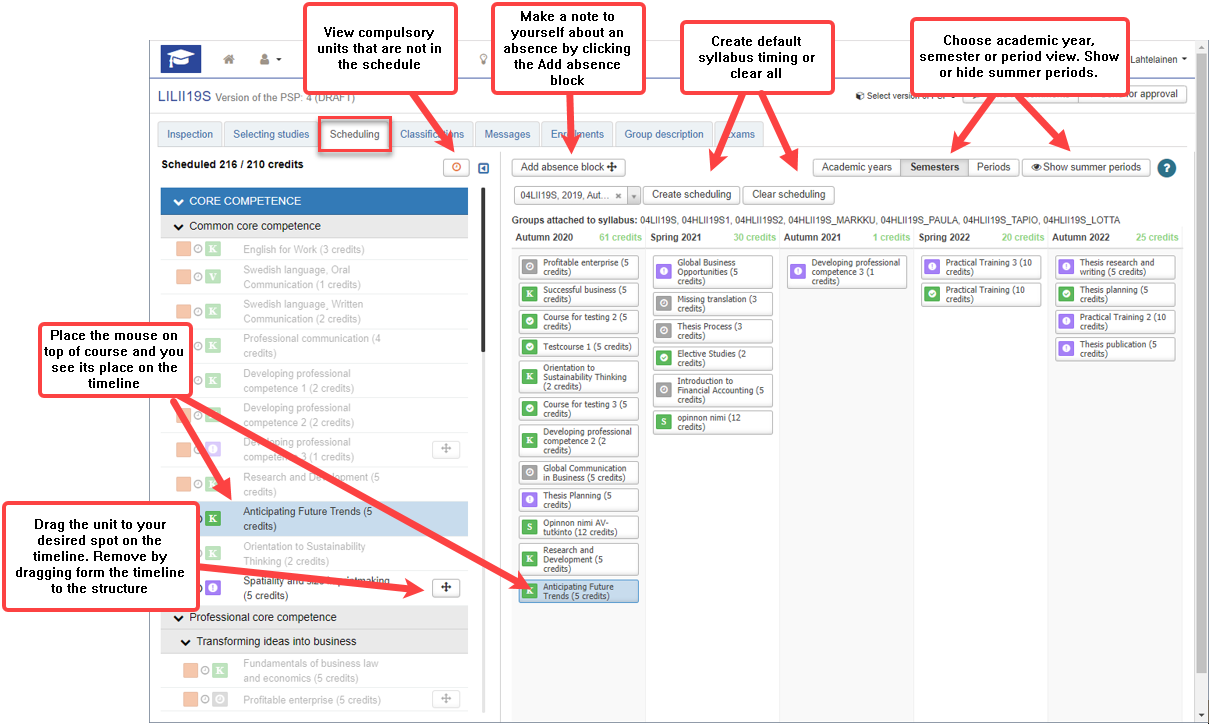
In the Scheduling tab you can create the default timings.
Scheduling a unit
You can create an automatic schedule based on the curriculum of your group by clicking the Create schedule button. You can edit the schedule by dragging the units on the timeline.
Editing a unit schedule
Drag the unit to your desired spot on the timeline
Removing a unit schedule
Drag the unit from the timeline to the structure on the left
Viewing the schedule
View compulsory units that are not in the schedule
- Click on the clock icon above the PSP structure
- Go back to viewing the full structure by clicking Show all
View the schedule on different periods of time
- Select Academic years, Semesters, Periods
Include summer periods on the schedule
- Click Show summer periods
Moving on the timeline: scroll with your mouse or use the scroll bar in the schedule
Make notes about absence
You can make a note to yourself about an absence by clicking the Add absence block. This note is not transferred to your attendance data. You need to enroll as absent during the enrollment period in the Semester enrollments section in Peppi.