
PSP Selecting studies - Peppi
You can select new study units to your PSP in the Selecting studies tab. The Enrollments tab automatically shows implementations for units that are part of your PSP.
In the Selecting studies tab you can compare units or hide unwanted alternative and elective studies from your PSP. Your tutor teacher can remove these units permanently.
Selecting new studies to your PSP
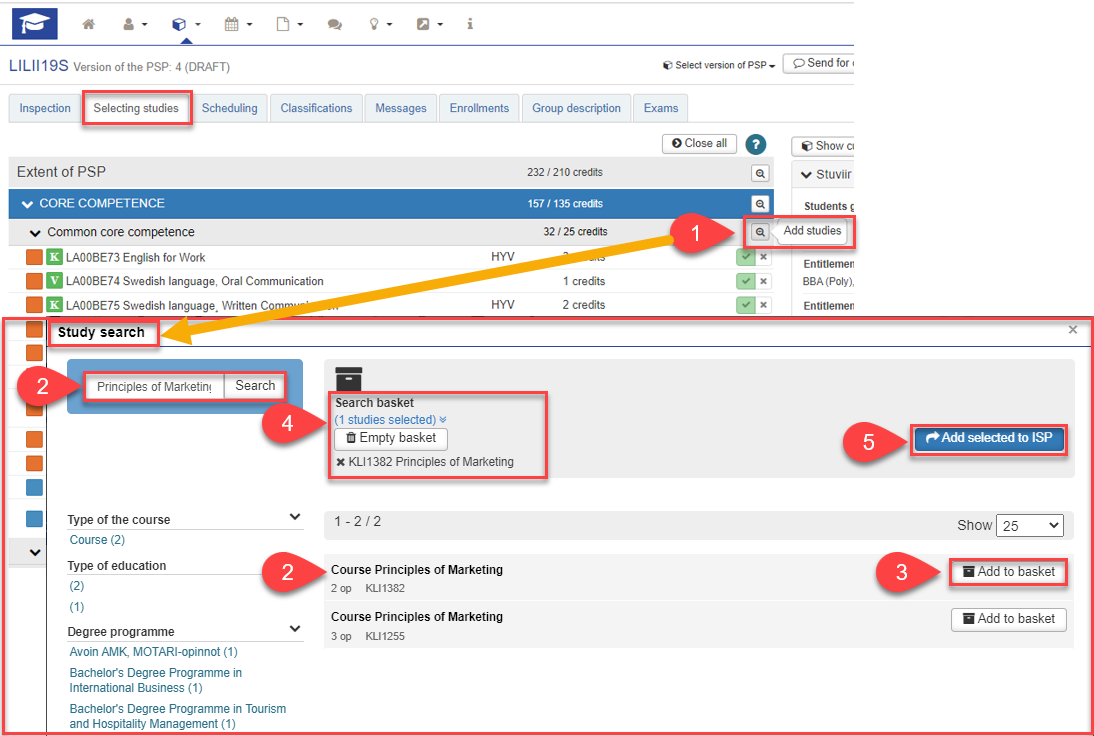
- Click the magnifying glass at the end of a study module where you want to add studies. The magnifying glass icon will open a study search pop-up window.
- Search for units based on their name or unit code by using the search bar.
Specify the search by adding filters from the left side section of the window. You can filter based on the type of the course, type of education, degree programme and degree title.
View a list of the search results based on the selected filters.
See more information of an individual unit or a module by clicking the name
- Select studies to your PSP by clicking the Add to basket button
- View studies in your basket by clicking the text (X studies selected)
- Remove all selected studies from your basket by clicking Empty basket
- Remove a single unit by clicking the X in front of a unit when you open your basket
- Add the selected studies to your PSP by clicking the Add selected to PSP button
Comparing units
You may compare the alternative and elective courses. Move the courses to the comparison basket and start comparing..
- Select studies to compare by clicking the Add to comparison
- Remove the course from comparison by clicking X
- After selecting units, a Compare courses window appears on the right side of your PSP. Click Compare to see the unit information side by side
- Remove a unit from your PSP by clicking the Delete selection button
- Add a unit to your PSP by clicking the Select button
- Close the window by clicking X or Cancel or use Esc button

Removing a unit from your PSP
Alternative unit
- Propose the removal of an alternative unit by clicking the red X button at the end of the unit name.
- Your teacher tutor can remove the unit from your PSP
Elective unit
- You can remove an elective unit by yourself by clicking the bin at the end of the unit name. If the unit has already been graded, you cannot remove the unit.
