
eRPL - Peppi
The use of Peppi ended in the summer of 2026, and it has been replaced by Sisu.
What is RPL?
RPL - Recognition of Prior Learning. The process is for students who want recognition of their acquired skills and ECTs received from prior learning.
eRPL is a service in Peppi to apply for the recognition and validation of previously acquired competences.
Pre-RPL application (in Peppi) is the pre-approval of future studies as part of one's PSP.
On this page you will find instructions on how to use Peppi's eRPL and how to apply for an RPL. Have you read the general RPL instructions before applying? You can find them here.
Please notice that the RPL process is intended to degree students and the RPL process can be started after LAB study right has been activated.
Cross-institutional studies
You can register for courses offered by other higher education institutions in Peppi using the cross study service after you have submitted a pre-RPL application. Read more about the cross-institutional studies and the related instructions and conditions.
Pre-RPL and eAHOT
Use these instructions if you want to register for a CampusOnline course AFTER November 19, 2024, and use Peppi's cross-study service.
Pre-RPL approval means that studies to be completed in the future are pre-approved as part of your PSP. Please note that you must complete the pre-RPL approval process before registering for a course offered through the cross study service.
Pre-application
You can find the pre-application function under My studies -> eRPL.
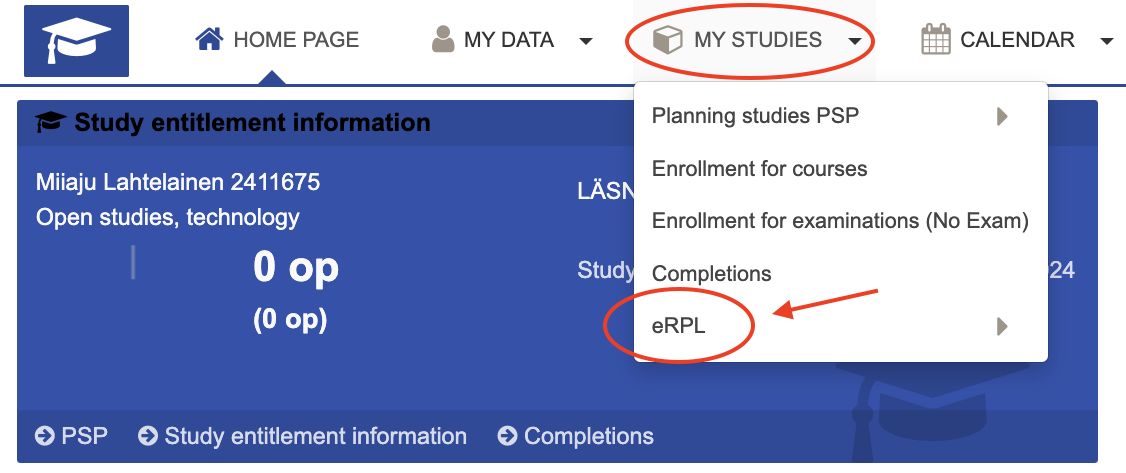
New pre-application
Start by clicking the +New pre-application button.
NB! The pre-application is used only when you would like to add a CampusOnline course to your PSP through cross study service.
The cross study service is a new feature in Peppi and from Nov. 2024 onwards all of the CampusOnline courses are added to the PSP by the student themselves BEFORE the course starts.

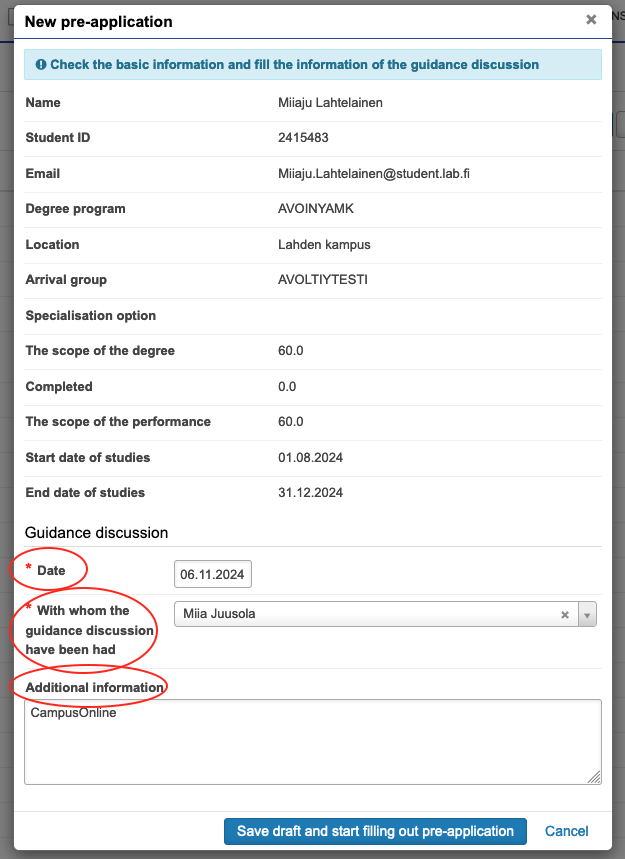
Guidance discussion
Fill in the information:
- Date of the guidance discussion
- With whom the guidance discussion was held - always select tutor teacher here
- Write "CampusOnline" in the Additional Information field
- ALWAYS indicate for CampusOnline studies: when and with whom the completion of the course has been agreed upon. If you have agreed with the tutor teacher during the study plan discussion (HOPS) that you can complete any courses as supplementary studies, use the date of the study plan discussion.
Place of performance
After saving the guidance discussion, click +Add place of performance to your application, which refers to the university of applied sciences which offers the CampusOnline course.
If you want to complete several different courses from different universities of applied sciences, remember to add the details of each institution to your application.
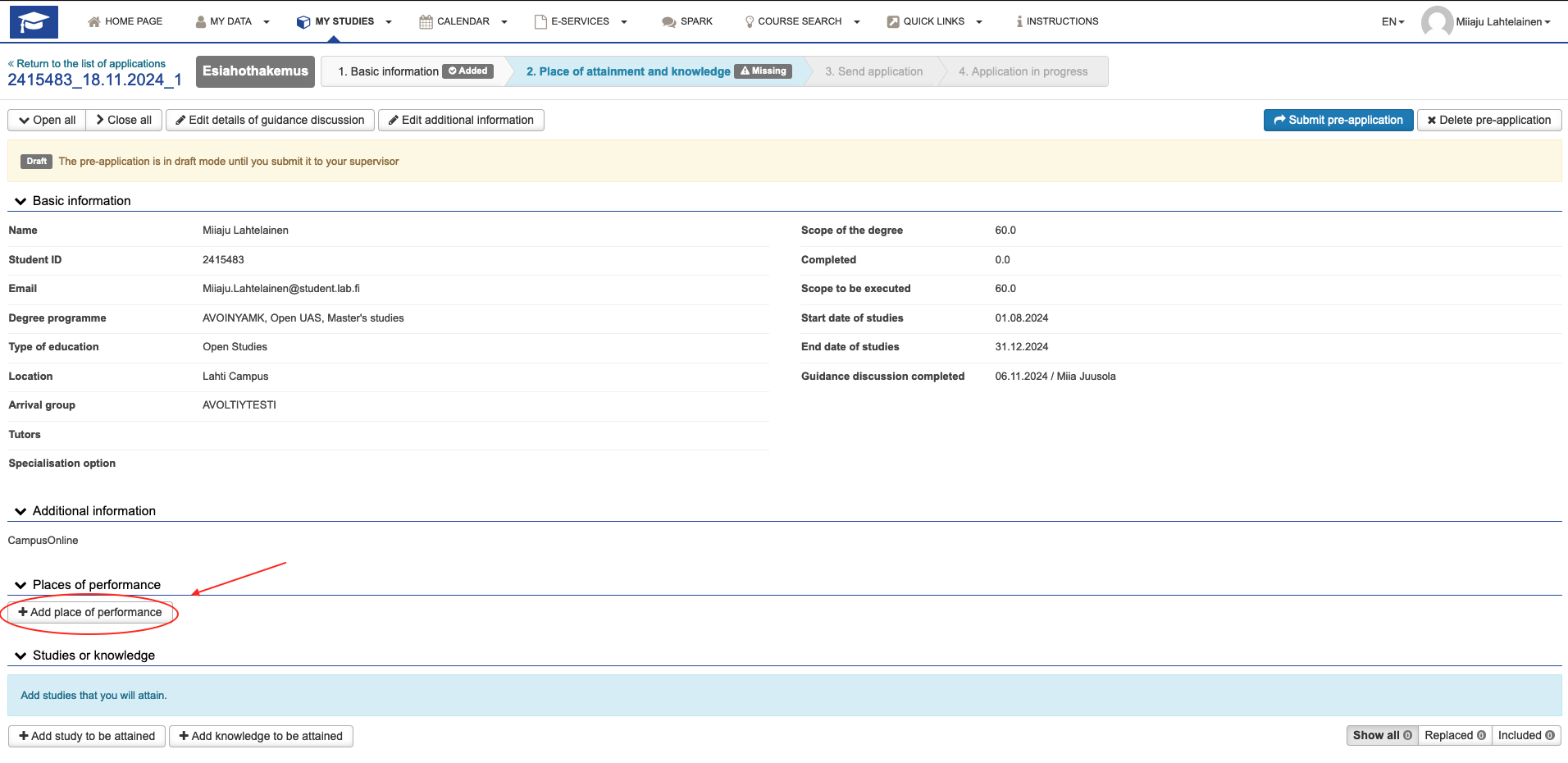
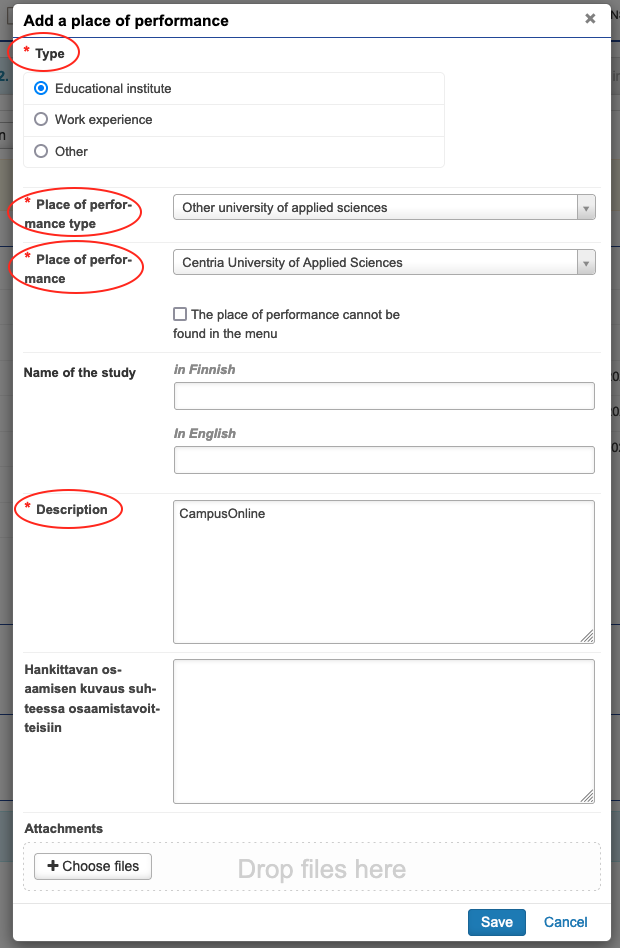
Select "Educational Institution" as the type and choose "another university of applied sciences" from the "place of performance type" dropdown.
Then, select the name of the university of applied sciences that offers the CampusOnline course from the "place of performance" dropdown.
Write "CampusOnline" in the description field.
Studies or knowledge
Add information on the CampusOnline studies by clicking the +Add study to be attained button.
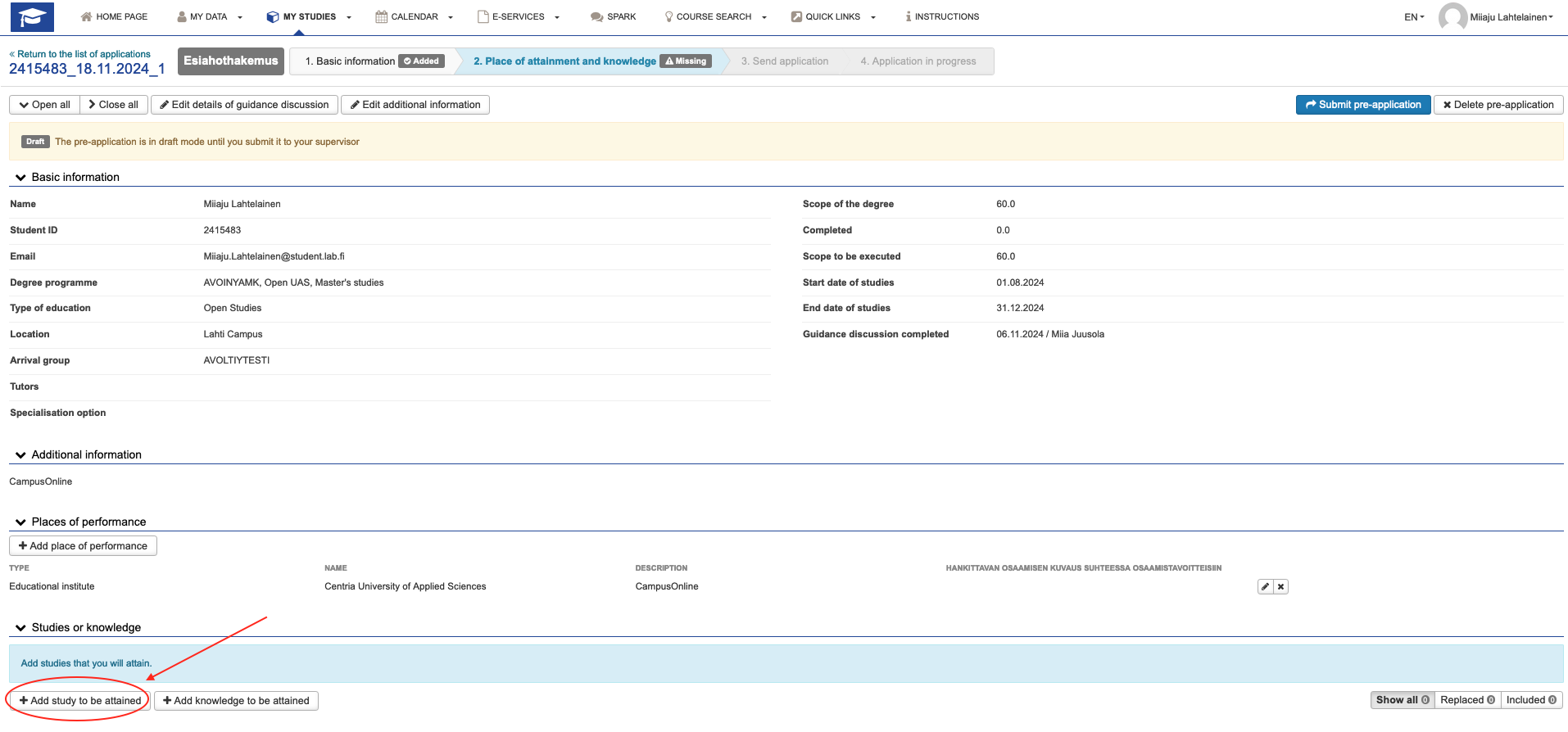
Add study to be attained
Select "Including" as the type of credit transfer being requested. CampusOnline courses will be included in the supplementary studies of your study plan (PSP).
Select your tutor teacher as the handler.
After this click +Lisää opinto (add study). Translation will be added updated soon.
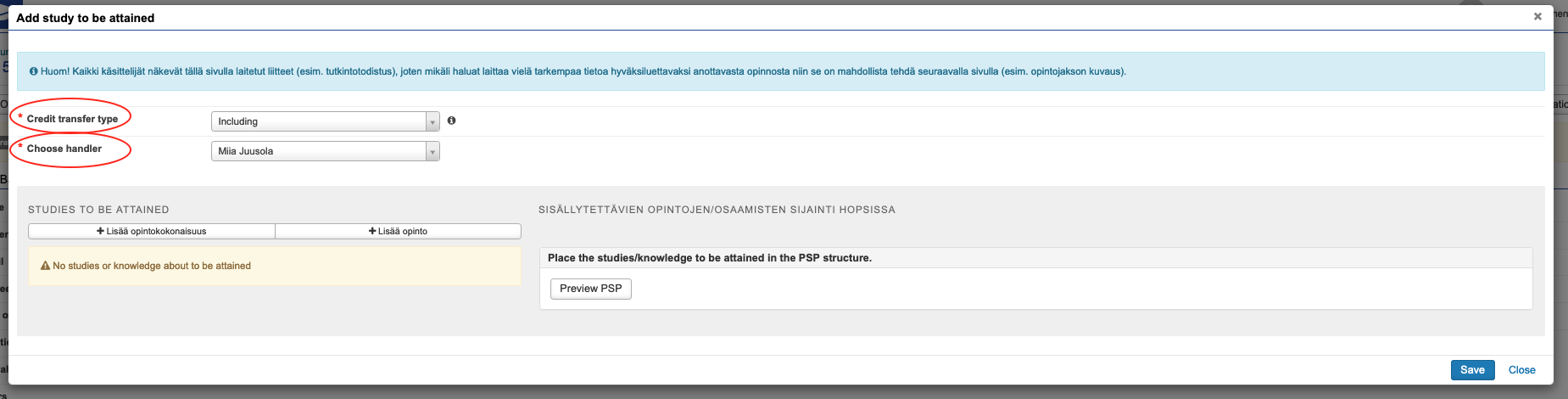
Add study
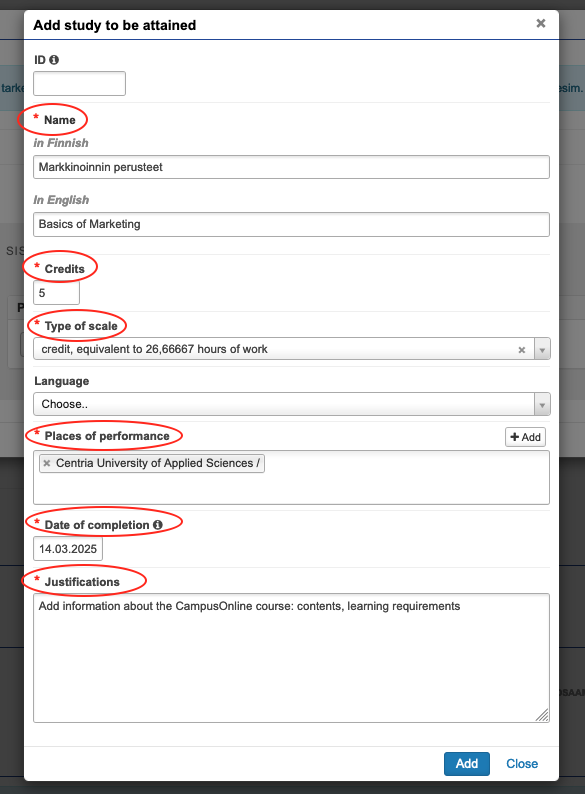
Add the details of the CampusOnline course to be completed:
- Course name in Finnish AND English
- Credits as the number of ECTS credits
- Select "credit" as the type of scale
- For the place of performance, select the university of applied sciences you previously added to the application
- Date of completion – provide an estimated date for when you expect to the course to be completed
- Justification – copy the course content and learning objectives. This is an important part, and based on this, your tutor teacher will decide whether the course you have chosen can be included in to your degree.
- Click Add.
Note! If you plan to complete multiple courses from the same university of applied sciences, you can add more courses to the same application. Just click +Lisää opinto (instructions above) an more courses.
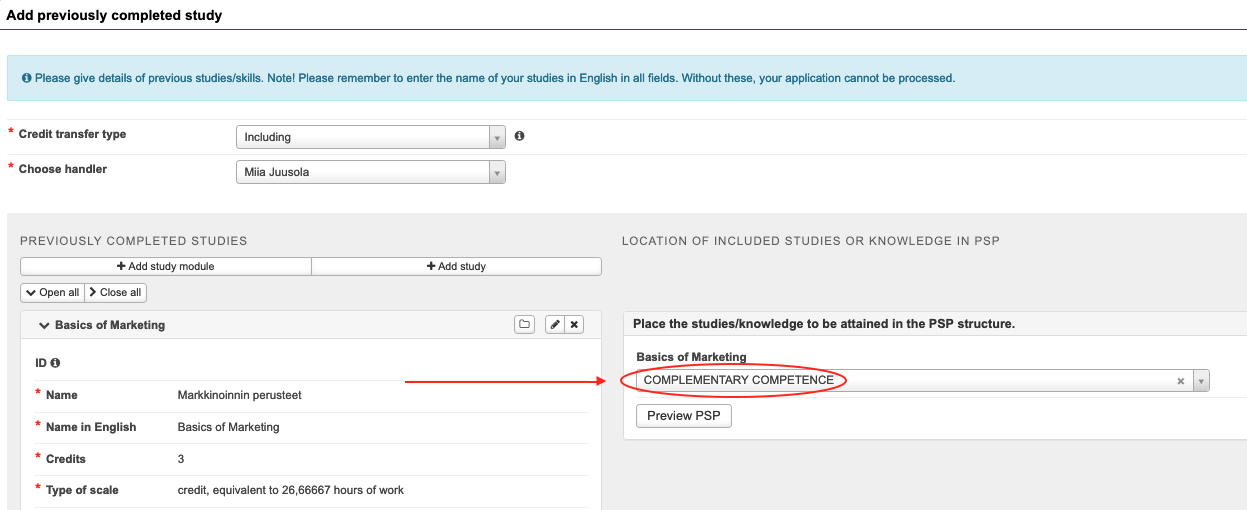
PSP structure
Choose "Complementary Competence" from your PSP.
Check and submit
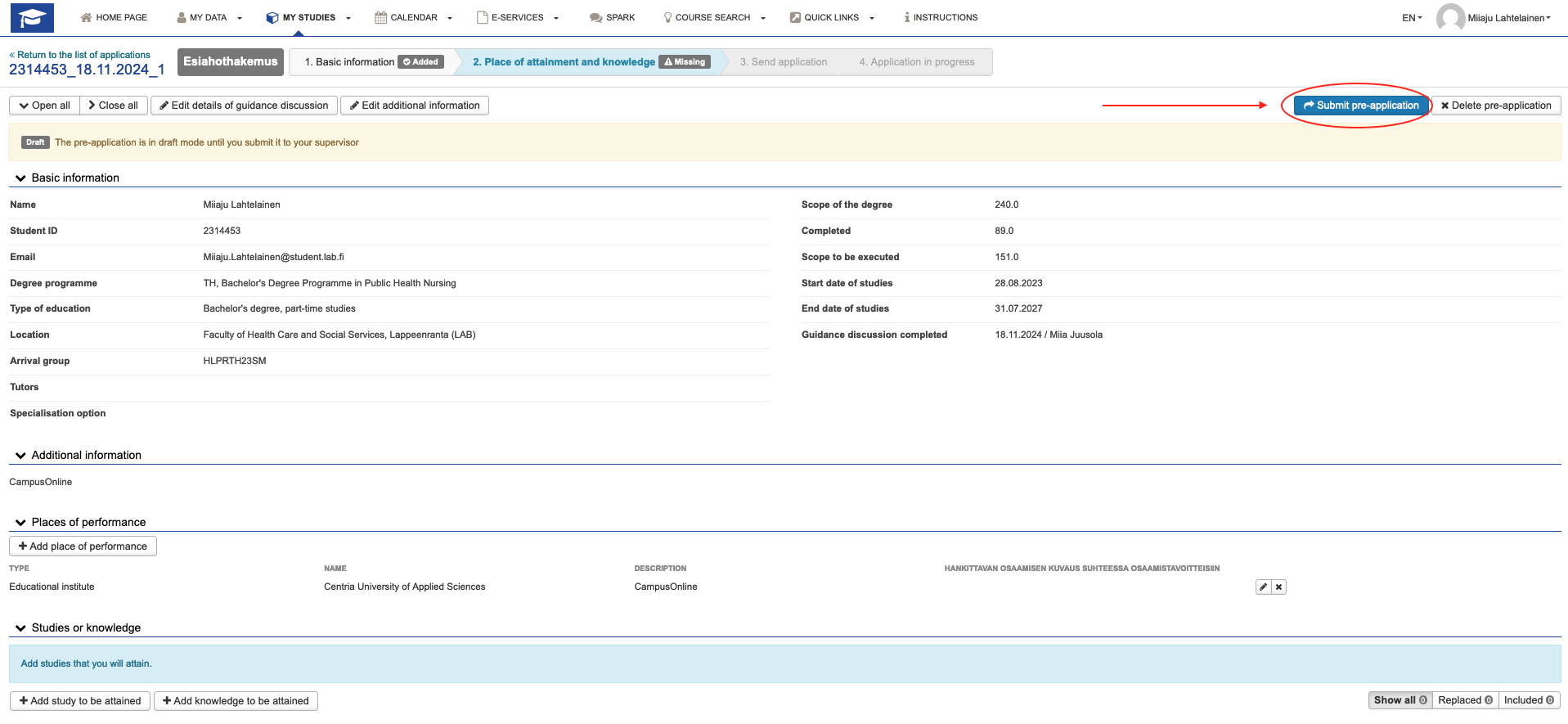
Once your happy with you application and you have added all of the Campus Online courses you would like to study, click Submit pre-application and the application will be sent to your tutor teacher. If your application is approved, you can then proceed to add the CampusOnline courses to your PSP.
Submit an eRPL application if you have previously completed studies or acquired skills that you want to include in your degree or use to replace studies included in your degree.
Fill an eRPL application following the instructions below (under the heading New eRPL application).
Open path students, please note! During open studies, credits from previous studies will not be accepted. Credits from previous studies will only be accepted once you become a degree student.
You must also fill in the name of the study module in English on the application form. If the translation is not listed and you have not received an English transcript from your educational institution, ask for a translation directly from the educational institution where you completed your studies.
Tips on how to fill RPL applications
Titles of completed studies
Some information in the application is requested in Finnish and in English. The name of the courses will be in your degree certificate. If you complete your degree in English, you will receive both a Finnish and an English-language diploma upon graduation.
If you have completed the course in Finnish, you must fill in the name of the course both in Finnish and in English. If you have completed your studies in English, please fill in the name information in both fields in English. See the case number 11. Insufficient applications will be returned to the student to complete.
Attachment to the eRPL application for studies when there is no transcript of records
The RPL application must be accompanied by documentation of your studies/competences (e.g. a transcript of records or a certificate of employment). If you do not have a transcript of records from your studies, you can check if studies are in your “My Studyinfo” -site and share the data from there. Site requires identification. NOTE: Site is only in Finnish! Please find instructions from here.
Sign-in to Peppi
You can find the eRLP section under My studies.

Start the process by making a new application
Compulsory fields are marked with a red star ( * ). The fields are compulsory because this information is required for the degree certificate and for UAS statistical monitoring.
See the example on how to fill the application.

Study guidance discussion
NB! Before filling out your eRPL application, first thing is to have a study guidance discussion about RPL with your tutor teacher. During the discussion, you should come up with a plan on what kind of eRPL applications you have to fill in order to have your previous studies/competence added to your LAB degree.
Fill in the following information:
- Date of the study guidance discussion
- Person who the discussion was with (always select a tutor teacher)
- In the additional information state what type of RLP you are applying for
- Substitution, inclusion, skill demonstration) and where you have completed your prior studies or acquired your competence.
- For CampusOnline courses
- Write down when and with whom the course was agreed. If you have agreed with your tutor teacher in the PSP discussion that you can take any of the studies as complementary studies, use the PSP discussion day to application
- Write "CampusOnline" to the field Additional Information.
Remember to save (blue button).

Places of performance
Add a new institution or organisation of prior learning.
Fill in information about your prior studies or competence in this section. If you are applying for RPL from several different institutions, add every institution to the application individually.

Select a type for the place of performance (educational institution, work experience, other)
Educational institution
- Select the correct educational institution
- Name of the study (write name of the earlier degree for example Bachelor degree of business administration or CampusOnline). The name of the course will be filled in later.
- You can also write the description or the competences acquired compared to the competence goals
- Add at least one attachment (certificate, transcript of records). If you do not have a transcript (e.g. for CampusOnline studies), see the instructions for adding an attachment under the heading Attachment to the eRPL application for studies where there is no transcript of records (e.g. CampusOnline)
- Save


Work experience OR other (for example hobbies or army)
- Leave the following fields empty: Place of performance type, Employer / other
- Select ”The employer can not be found in the menu”
- Fill in the employer name in Finnish and in English
- You can also write description or the competences acquired compared to the competence goals
- Add at least one attachment (Reference, employment certificate, other document)
- Save

Studies or competences
Be extremely careful here!
Add a previously acquired competence or a previously completed study to your application by choosing the correct option (screen capture below).
Add previously completed study: previous learning (e.g. previous studies or CampusOnline studies taken during studies)
Add previously acquired competence: other previously acquired skills (e.g. work experience, hobbies)
If you have several studies/competences, please return to this checkbox and add each one as a separate field. You can find example cases from this page that will help you fill out your eRPL application.

Previously completed study (screen capture below)
1. Pick the correct option for credit transfer (Replacement/Including).
Replacement: Replaces a course from your PSP
Including: Your previously completed course will be added to your PSP (usually to the Complementary Competence - section)
2. Choose a handler to your application.
Usually your tutor teacher is the one who will handle eRPL applications but it could also be another teacher, who you have had you study counselling discussion with.
NB! If you are applying to transfer credits from a CampusOnline course and you choose the study secretary of you group as the handler IF you are seeking to include the course to your PSP. Otherwise, choose your tutor teacher as the handler.
3. Add a study or a study module to your application.
Add a study or a study module. Only use the study module option if you have for example completed a minor (25 ECTS etc.) at another university. Do not use it for single courses as they need to be added to the application by choosing the +Add study button.
4. Add the information regarding the course you have completed.
5. Choose a course from your PSP you would like to replace (screen capture below refers to a replacement of study).
Add a course from your PSP by clicking the cross icon.
NB! lf you are planning to include a course into your PSP, then Peppi will show you a slightly different view and you will choose a section from your PSP where the course would be included (for example Complementary Competence).
6. The course you have chosen will be shown in this section.
Take your time when filling the application and if you need more help, see the example cases below for more detailed instructions.
Remember to save.

Previously acquired competence
1. Pick the correct option for credit transfer (Replacement/Including).
Replacement: Replaces a course from your PSP
Including: Your previously acquired competence will be added to your PSP (usually to the Complementary Competence - section)
2. Choose a handler to your application.
Usually your tutor teacher is the one who will handle eRPL applications but it could also be another teacher, who you have had you study counselling discussion with.
3. Add information about your competence by clicking "Add knowledge".
4. You'll see the title of your competence at the middle section of the application.
In the example below, the student is applying to get credit from competence gained from a summer trainee position.
5. By clicking the "Preview PSP" you can see the different sections in your PSP and then you can choose the correct one from the dropdown menu.
Make sure you have agreed with your tutor teacher on where the credits from your previous competence will be included.
If you are not sure how to fill in the information, please check the case descriptions for further instructions.
Remember to save.

Editing saved application
You can edit the information from the pen icon. You can add other competencies from the selection button.
 Image 9. Editing saved application
Sending a saved application
The application is saved as a draft and remains a draft until you send it to the person who handle your application. The submit button is in the top right-hand corner of the application.
Once you have sent the application, you cannot no longer edit it. Therefore, please fill in the application carefully. The handler will return or decline an incomplete or wrongly filled application. Please follow the handler’s instructions if the application returns to you. You will get an e-mail notification if the application returns to you.

As a new feature in Peppi, you can find all of the attachments you have added to your eRPL applications. The RPL Attachment Bank can be found from underneath the eRPL menu.
 You can also add attachments to the bank for later user.

Cases
In all cases presented below, you have already filled in the place of performance to the system. Choose the right case for your RPL and follow the instructions below.
Case: You have completed a study unit in another education institute that corresponds a study unit in your PSP in terms of the content and extent.
Credit transfer type: Replacement
Choose handler: Usually your tutor teacher or another teacher you have agreed to be the handler
Choose +Add study:
- ID field will be left empty
- Name field both in Finnish and English
- Number of Credits and Type of scale (NB! Type the amount of ECTS credits with numbers only)
- Language in which the study unit was conducted
- Grade
- Choose the place of performance
- Date of the original performance of the study unit
- You can write more information to the Justifications field
Choose from the studies in PSP: Pick the correct study unit from your PSP as agreed with the handler of your application. Click the cross icon or drag the study unit to the right side of the application (Studies selected to application).
Remember to save.
After saving, you will see this replacement on your application and you can add more prior studies/competences to your application if needed.

Case: You have completed a study unit in another educational institute which you want to include into your degree, but your PSP does not have a corresponding study unit to be replaced.
Credit transfer type: Including
Choose handler: Usually your tutor teacher or another teacher you have agreed to be the handler
Choose +Add study:
- ID field will be left empty
- Name field both in Finnish and English
- Number of Credits and Type of scale (NB! Type the amount of ECTS credits with numbers only)
- Language in which the study unit was conducted
- Grade
- Choose the place of performance
- Date of the original performance of the study unit
- You can write more information to the Justifications field
Place the studies/knowledge to be attained in the PSP structure: Pick the correct section where you would like your previously completed study to be included. In this example the student would like to include the course Marketing to the Complementary Competence section in the student's PSP.
Please decide the correct section with your tutor teacher/handler of the application.
Remember to save.
After saving, you will see this credit transfer on your application and you can add more prior studies/competences to your application if needed.

Case: You have gained prior competence through work, hobby or other ways and you want to replace a study unit in your PSP with this competence. Check the content of the study unit you want to replace and compere your competence to it.
Credit transfer type: Replacement
Choose handler: Usually your tutor teacher or another teacher you have agreed to be the handler
Add knowledge: Add information about your prior competence. In this example a student would like to replace a course from the student's PSP with work experience.
- Grade field will be left empty
- Choose the right place of performance particularly to this study unit
- Add the date of completion. For example, if the competence is gained with work experience choose the date when your employment ended, or you received the work certificate.
- You can write more information to the Justifications field
Choose from the studies in PSP: Pick the correct study unit from your PSP as agreed with the handler of your application. Click the cross icon or drag the study unit to the right side of the application (Studies selected to application).
Remember to save.
After saving, you will see this replacement on your application and you can add more prior studies/competences to your application if needed.

Case: You have gained prior competence through work, hobby or other ways and you want to include the competence into your degree.
Credit transfer type: Including
Choose handler: Usually your tutor teacher or another teacher you have agreed to be the handler
Add knowledge:
- Grade field will be left empty
- Choose the right place of performance
- Add the date of performance. For example, if the competence is gained with work experience choose the date when your employment ended, or you received the work certificate.
- You can write more information to the Justifications field
Place the studies/knowledge to be attained in the PSP structure: Pick the correct section where you would like your previously completed study to be included.
Please decide the correct section with your tutor teacher/handler of the application.
Remember to save.
After saving, you will see this credit transfer on your application and you can add more prior studies/competences to your application if needed.

Case: You have several study units which together correspond to the content of one study unit in your PSP. You would like to replace that study unit in your PSP with your prior studies.
Credit transfer type: Replacement
Choose handler: Usually your tutor teacher or another teacher you have agreed to be the handler
Choose +Add study:
- ID field will be left empty
- Name field both in Finnish and English
- Number of Credits and Type of scale (NB! Type the amount of ECTS credits with numbers only)
- Language in which the study unit was conducted
- Grade
- Choose the place of performance
- Date of the original performance of the study unit
- You can write more information to the Justifications field. For example write a reminder to the handler saying that as you have discussed before, you would like to replace one of your studies in PSP with the two previously completed courses (as seen in the example below).
NB! When you are applying for a credit transfer with multiple courses, remember to add all of them to the same application. In the example below, a student would like to replace the study unit Sales and Marketing with previously completed courses called Marketing and International Sales.
Choose from the studies in PSP: Pick the correct study unit which will be replaced with your prior courses from your PSP as agreed with the handler of your application. Click the cross icon or drag the study unit to the right side of the application (Studies selected to application).
Remember to save.
After saving, you will see this replacement on your application and you can add more prior studies/competences to your application if needed.

Case: You have several different competences which together correspond to the content of one study unit in your PSP. You would like to replace one of the study units in your PSP with those previously attained competences.
Credit transfer type: Replacement
Choose handler: Usually your tutor teacher or another teacher you have agreed to be the handler
Add knowledge:
- Grade field will be left empty
- Choose the right place of performance
- Add the date of performance. For example, if the competence is gained with work experience choose the date when your employment ended, or you received the work certificate.
- You can write more information to the Justifications field
NB! If you have more than one previously attained competences you would like to use to replace one study unit in your PSP, remember to add all of them to the same application (as shown below). In the example, a student would like to replace a study unit "Sales and Marketing" with work experience gained working as a trainee in two companies.
Choose from the studies in PSP: Pick the correct study unit from your PSP as agreed with the handler of your application. Click the cross icon or drag the study unit to the right side of the application (Studies selected to application).
Remember to save.
After saving, you will see this replacement on your application and you can add more prior studies/competences to your application if needed.

Case: You have previously completes studies and other competences which together correspond to the content of a study unit in your PSP. You would like to replace one of the study units in your PSP with those previously completed study/competences.
Solution:
As you are seeking RPL with previously completed studies AND with previously gained competence (for example work experience) you have to fill out two different sections to your eRPL application.
Fill out the first section according to the instructions on case 1 and the second section as case 3.
Choose the same study unit you would like to replace to both of the applications sections so that the handler can see that you would like to replace the same study unit in your PSP.
Remember to remind the handler of the application about the details of your wish to replace that one study unit. Write this information to the Justifications - field. Notice that you should always discuss the details of your RPL with you tutor teacher BEFORE sending out the eRPL application.
Case: You have completed 10 ECTS Marketing course at another educational institution, but the Marketing course in your PSP is only 5 ECTS.
Solution:
You can apply for a credit transfer which will replace the Marketing course in your PSP as in case 1 and the apply to include the remaining 5 ECTS for example into the Complementary Competence - section in your PSP as in case 2.
This means that you have to fill out two different application sections with the same information (one for replacement and one for including).
It is important that you write the details of your plan to the Justifications - field in both of the application sections. Notice that you also have to discuss your plans with your tutor teacher BEFORE sending the application.
Case: You have completed a study unit at another institute/have competence you would like to use to replace a study unit in your PSP.
However, the credits in your previously completed course are less than in the study unit you would like to replace.
Or in a case of competence, your previous work experience (or such) does not quite match the criteria in the study unit you would like to replace.
Solution:
In accordance with our policy, partial replacement of a study unit will not be accepted as it is. The missing credits in the study unit you have chosen to your application have to be completed.
The teacher of the course will decide in which way you can complete the rest of the study unit (for example by completing extra assignments, skill demonstration etc.) and will make an agreement with you which states the tasks needed to be completed. Once you have completed the tasks given to you by the teacher, the study unit in your PSP will be replaced.
Case: You have completed 10 ECTS Marketing course at another educational institution and you want to substitute two study unit in your PSP with that.
Solution:
In case of previously completed studies:
Start by filling out the eRPL application as shown in case 1.
As you would like to replace more than one study unit in your PSP, pick all the units you would like to replace into the same application (as shown below).

In case of previously gained competence:
Fill out the application as shown in case 3.
As you would like to replace more than one study unit in your PSP, pick all the units you would like to replace into the same application (as shown below).


Picture 13. Course completed in Finnish

Picture 14. Course completed in English